Friday, January 3, 2014

Sweet Home 3D 4.2

Sweet Home 3D is a free interior design application that helps you place your furniture on a house 2D plan, with a 3D preview.
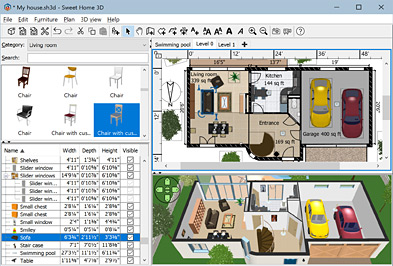
Draw straight, round or sloping walls with precise dimensions using the mouse or the keyboard.
Insert doors and windows in walls by dragging them in the plan, and let Sweet Home 3D compute their holes in walls.
Add furniture to the plan from a searchable and extensible catalog organized by categories such as kitchen, living room, bedroom, bathroom.
Change color, texture, size, thickness, location and orientation of furniture, walls, floors and ceilings.
While designing the home in 2D, simultaneously view it in 3D from an aerial point of view, or navigate into it from a virtual visitor point of view.
Annotate the plan with room areas, dimension lines, texts and show the North direction with a compass rose.
Create photorealistic images and videos with the ability to customize lights and control sunlight effect according to the time of day and geographic location.
Import home blueprint to draw walls upon it, 3D models to complete default catalog, and textures to customize surfaces.
Print and export PDFs, bitmap or vector graphics images, videos and 3D files in standard file formats.
Extend the features of Sweet Home 3D with plug-ins programmed in Java, or by developing a derived version based on its Model View Controller architecture.

 Download


Thursday, January 2, 2014

WBI Creator v4.1.8.25


WBI Creator is an easy to use small handy windows application which facilitates you to create bootable ISO image for windows files which you have stored on your system by copying Windows installation disk.
It supports bootable image creation for Windows XP, Vista, 7 and Windows 8 as well.This program is just like a wizard so you just have to select that of what OS you are going to make the ISO image like Windows XP, Vista, 7 or Widnows 7 and provide the CD/DVD label and choose and output path and you are done.
It will take few minutes and will give you with an ISO image ready for you to burn.It comes with burning options so you can burn the created ISO image or any other ISO image using this program.
It currently supports all types of CD and DVD formats for burning ISO.It doesn’t supports Blue-ray discs.

http://www.cozli.com/software/wbi-creator

Sunday, December 29, 2013

Disable Password Complexity Requirements in Windows Server 2003 and 2008


If you are using Windows Server 2003 or 2008, you might be aware of annoying password complexity requirements.
Whenever you want to create or update the password for your account or a new account, your password must meet the following minimum requirements:
1. Passwords cannot contain the user's account name or parts of the user's full name that exceed two consecutive characters.
2. Passwords must be at least six characters in length.
3. Passwords must contain characters from three of the following four categories:
  • English uppercase characters (A through Z).
  • English lowercase characters (a through z).
  • Base 10 digits (0 through 9).
  • Non-alphabetic characters (for example, !, $, #, %).
If you want to disable these password complexity requirements, simply follow these simple steps:
STEP 1: Type gpedit.msc in RUN or startmenu search box and press Enter. It'll open Group Policy Editor.
STEP 2: Now go to:
Computer Configuration -> Windows Settings -> Security Settings -> Account Policies -> Password Policy
STEP 3: In right-side pane, double-click on "Password must meet complexity requirements" option and set it to "Disabled".

You can also set "Maximum password age" option to 0 (zero) so that your password never expires.
STEP 4: Now run following command in Command Prompt to refresh the policy:
gpupdate /force
That's it. Restart your system and now you'll not have to fulfill annoying password complexity requirements.

WiNToBootic - The Ultimate Windows 7/8 USB Boot Disk Maker

WiNToBootic is a freeware that allows you an easy creation of bootable Windows USB hard or flash disk from an ISO image, CD/DVD or Folder. This product is focused on creation of boot disks based on Microsoft Windows NT 6.x OS family (Vista, 7, 8, Server 2008, Server 2012).

Features:
  • Windows 7/8 focused Boot Disk Maker
  • Make bootable USB Flash or Hard Disk rd or flash disk from an ISO image, CD/DVD or Folder. This product is focused on creation of boot disks based on Microsofnt and Fast
  • Standalone

More Features:
  • NTFS Support
  • Windows 7/8 Bootloader
  • Burn from ISO 9660 (Joliet)
  • Burn from ISO 13346 (UDF)
  • Burn from DVD or Folder
  • Boot support for: Windows Vista/7/8/2008/2012
  • Boot support for: Windows PE2/PE3/PE4
  • Standalone
  • Super User Friendly
  • Very Fast    

 Download

Friday, February 12, 2010

ImgBurn 2.5.8.0

ImgBurn is a lightweight CD / DVD / HD DVD / Blu-ray burning application that everyone should have in their toolkit!
It has several 'Modes', each one for performing a different task:
  • Read - Read a disc to an image file
  • Build - Create an image file from files on your computer or network - or you can write the files directly to a disc
  • Write - Write an image file to a disc
  • Verify - Check a disc is 100% readable. Optionally, you can also have ImgBurn compare it against a given image file to ensure the actual data is correct
  • Discovery
  • - Put your drive / media to the test! Used in combination with DVDInfoPro, you can check the quality of the burns your drive is producing 
ImgBurn supports a wide range of image file formats - including BIN, CCD, CDI, CUE, DI, DVD, GI, IMG, ISO, MDS, NRG and PDI.
It can burn Audio CD's from any file type supported via DirectShow / ACM - including AAC, APE, FLAC, M4A, MP3, MP4, MPC, OGG, PCM, WAV, WMA and WV.
You can use it to build DVD Video discs (from a VIDEO_TS folder), HD DVD Video discs (from a HVDVD_TS folder) and Blu-ray Video discs (from a BDAV / BDMV folder) with ease.
It supports Unicode folder/file names, so you shouldn't run in to any problems if you're using an international character set.
ImgBurn supports all the Microsoft Windows OS's - Windows 95, Windows 98, Windows Me, Windows NT4, Windows 2000, Windows XP, Windows 2003, Windows Vista, Windows 2008, Windows 7 and Windows 8 (including all the 64-bit versions). If you use Wine, it should also run on Linux and other x86-based Unixes.
It's a very flexible application with several advanced features that are often lacking in other tools, especially when it comes to burning DVD Video discs. It supports all the latest drives without the need for updates (including booktype / bitsetting / advanced settings on many of the major ones - i.e. BenQ, LiteOn, LG, NEC, Optiarc, Pioneer, Plextor, Samsung, Sony).
There is an image queue system for when you're burning several images (which you can automatically share between multiple drives if you have more than one) and an easy-to-use layer break selection screen for double layer DVD Video jobs. The Automatic Write Speed feature allows you store your favourite burn speed settings on a per 'Media ID' basis, right down to a drive by drive level. Data captured during the burn (write speed, buffer levels etc) can be displayed / analysed using DVDInfoPro
Download ImgBurn

Wednesday, February 10, 2010

Steps to Remove regsvr.exe Virus

What the regsvr.exe virus does?
regsvr.exe is classified as a W32.Imaut worm•    This worm creates folders and a registry entry to enable its automatic execution at every system startup.
•    This worm also creates a scheduled task to enable its automatic execution at a specified date and/or time.
•    It also creates Autorun.inf file for its auto execution.
Solution to fix the problem:
1.    If the task manager and registry editor is disabled then we need to enable them first. Read this post.
2.    Delete the Autorun.inf file created by the virus. Read this post to know how to do that.
3.    Now type msconfig in the Run dialog and click on startup tab.
4.    Look for regsvr and uncheck any options, click OK.
5.    Now traverse to control panel -> scheduled tasks, and delete the At1 task that might be listed there.
6.    Type regedit in the Run dialog to open the registry editor.
7.    Click on Edit -> Find and search for regsvr.exe
8.    Just delete all the occurrences of regsvr.exe virus (do not confuse it with regsvr32.exe which is not a virus).
9.    Navigate to entry HKEY_LOCAL_MACHINE\SOFTWARE\Microsoft\Windows NT\CurrentVersion\Winlogon and modify the entry Shell = “Explorer.exe regsvr.exe” to delete the regsvr.exe from it.

10.    Now to actually delete the virus from the system go to system32 folder and delete the regsvr.exe virus file from there (you will need to uncheck the option of “Hide Protected System Files and Folders” in Folder Options to view the virus file).
Reboot the system for changes to take place.

Solution to remove Blue Color Shadow from the Desktop Icons

Our computer looks fresh and good with our desktop icons. We all must have placed some or other icons on our desktop and thus it has become a common problem that we often see either Blue or a different Color Shadow under the icons placed at our desktop.
So if you are also facing this problem and doesn’t actually know how to fix this problem then here is the solution.
Solution:
1.    This problem is only caused when we have selected the option of “Lock Web Items on Desktop”. To turn it off, right click on the desktop and go to “Arrange Icons By” and uncheck the option of “Lock Web Items on Desktop”.

2.    This option should have solved your problem but if you just like to change the blue color and not turn it off, then right click on desktop.
3.    Click on Properties -> Appearance -> Advanced button. Now select “Desktop” from the Item drop down list and choose the desired color in the “color1” option.
Update:
One of our readers ersin, found a working solution which is
  • Go to Display Properties -> Desktop tab -> Customize Desktop -> Web tab
  • Make sure that you have both the web pages listed below and the option Lock Desktop Items Unchecked.
  • OK and exit.